Let customers book only on the days you're in their area
Website plan · $39 CAD / month
If you drive to customers, a normal booking tool is a problem. It lets someone across town book right after someone next door, and your day disappears in traffic.
With booking by area, the customer enters their postal code first. They only see the days and times you work in their area.
What you can do
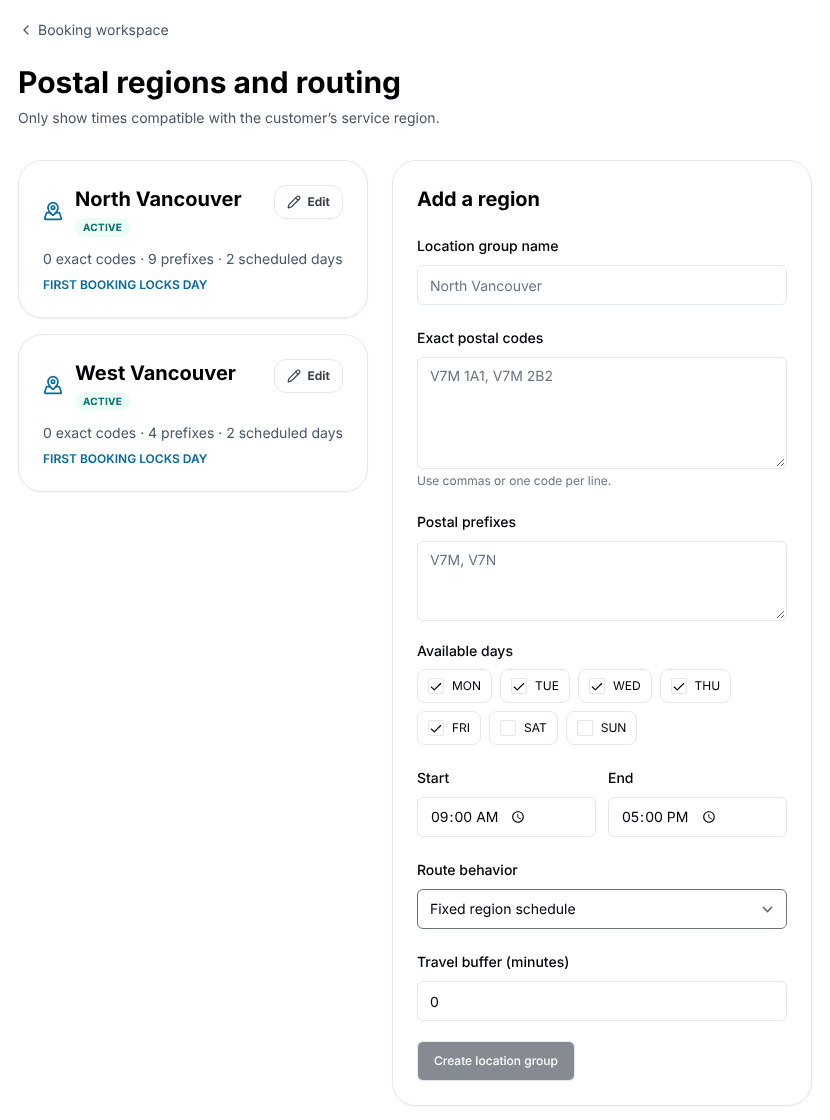
Areas from postal codes
Make an area from whole postal codes (V7M 1A1) or the first part of a postal code (V7M), or both.
Days and hours per area
For example, North Vancouver on Mondays and Wednesdays, 9 to 5.
Travel time
Add travel minutes between bookings in an area, so you are never late to the next one.
Services per area
Offer some services only in some areas.
Keep a day in one area
Once the first booking of the day is made in one area, other areas can't book that day.
Or keep a few hours in one area
The same idea for a block of time, like four hours, so you can do two areas in one day.
Pause an area
Turn an area off without deleting it.
How it works
- 1
Turn on postal code checks
In your booking settings, ask customers for their postal code before they see times.
- 2
Make your areas
Give each one a name, its postal codes, its days and hours and any travel time.
- 3
Choose how a day fills up
Pick a route behaviour: Fixed region schedule, First booking locks day, First booking locks time block, or Allow multiple regions.
- 4
Link your services
Choose which services can be booked in each area.
Example: a mobile dog groomer on the North Shore
Sam grooms dogs at customers' homes. Sam makes two areas: North Vancouver (V7G to V7R) on Mondays and Wednesdays, and West Vancouver (V7S, V7T, V7V, V7W) on Tuesdays and Thursdays, with 20 minutes of travel time between visits.
A customer in V7T enters their postal code and only sees Tuesday and Thursday times. A customer in Squamish sees a message that the postal code is outside the service area, instead of booking a visit Sam can't make.
On Fridays Sam covers both areas, with "First booking locks time block" set to four hours, so the morning stays in one area and the afternoon in the other.
Good to know
- Areas are based on Canadian postal codes. There is no map drawing or live traffic.
- Booking by area is part of online booking on the Website plan.
Questions
- Who is this for?
- Anyone who goes to the customer: cleaners, groomers, tutors, movers, mobile mechanics, trades and home care.
- What does a customer see if I don't serve their postal code?
- They see that the postal code is outside your service area, and no times are shown.
- Can I serve the same postal code from two areas?
- Each postal code should belong to one area. Use the first part of a postal code for wide areas and full codes for exceptions.
- Does it plan my route?
- No. It keeps your bookings grouped by area and adds travel time. You still choose your own route.
Start with a free profile.
Add the basics for free, then decide later whether a paid plan is worth it for your business. Prices in CAD plus applicable tax, monthly, no contract.