Know exactly what to do next, one small step at a time
Profile plan · Free
We are turning the guided dashboard on for businesses one at a time. Ask us to switch it on for yours.
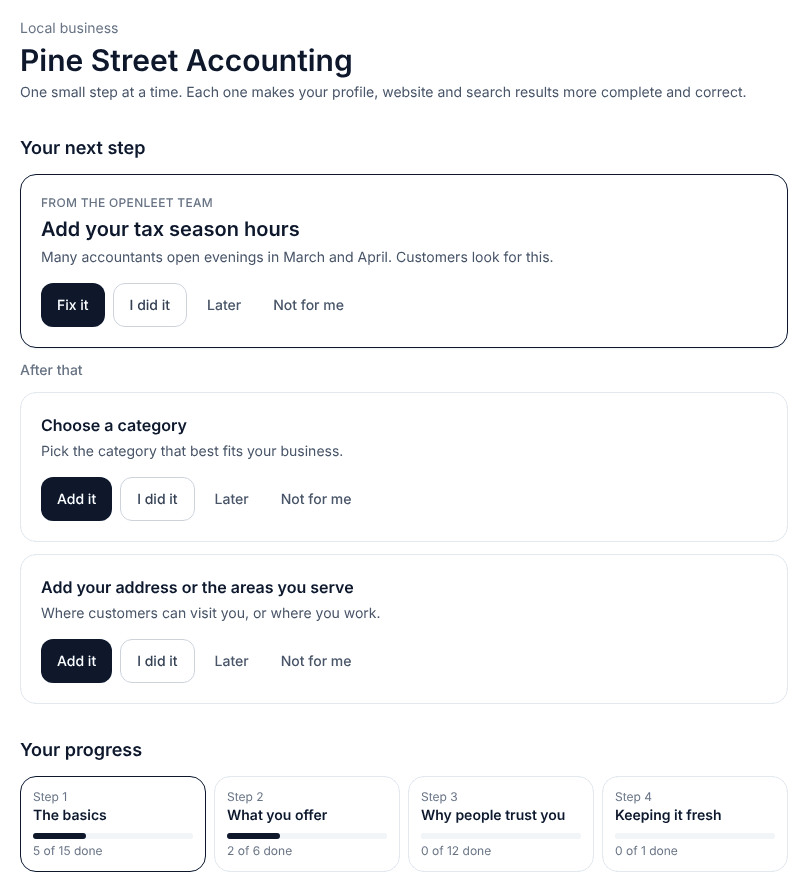
A dashboard full of menus makes busy owners close the tab. The guided dashboard asks one question: what is the most useful thing to do next?
It shows that step at the top, the two after it, and how far along you are. If you don't have time, ask the Openleet team to do it for you.
What you can do
Today
Your next step and the two after it. Each has Add it, I did it, Later and Not for me.
Progress in four stages
The basics, What you offer, Why people trust you, and Keeping it fresh.
Suggestions from our team
We add steps that fit your business, like tax season hours for accountants.
Do it for me
Ask the Openleet team to do a step for you. You can have two requests open at a time.
Where people see your information
Links to your public profile, your town page, your website and the files search engines and AI assistants read.
How it works
- 1
Open Today
Start with the step at the top. Most take a few minutes.
- 2
Mark it done, later or not for me
The list moves on. Steps you skip don't keep coming back.
- 3
Add something new
Add a service, project, article or event from one place.
A real step
For an accountant, a team suggestion might read: "Add your tax season hours. Many accountants open evenings in March and April. Customers look for this."
Press Fix it to go straight to your hours, or Do it for me to ask us.
Questions
- Can I still use the full dashboard?
- Yes. All settings stay one click away.
- Is Do it for me free?
- Yes, for now. You can have two requests open at a time.
- How do I get the guided dashboard?
- Email info@openleet.com and we'll switch it on for your business.
Start with a free profile.
Add the basics for free, then decide later whether a paid plan is worth it for your business. Prices in CAD plus applicable tax, monthly, no contract.