Find the mistakes and gaps on your profile before customers do
Profile plan · Free
Every plan gets the health check. Some fixes, like adding FAQs or a team, need Discovery.
Small mistakes cost customers: an old phone number in an article, a website link that no longer loads, a different business name on each page. You rarely notice them yourself.
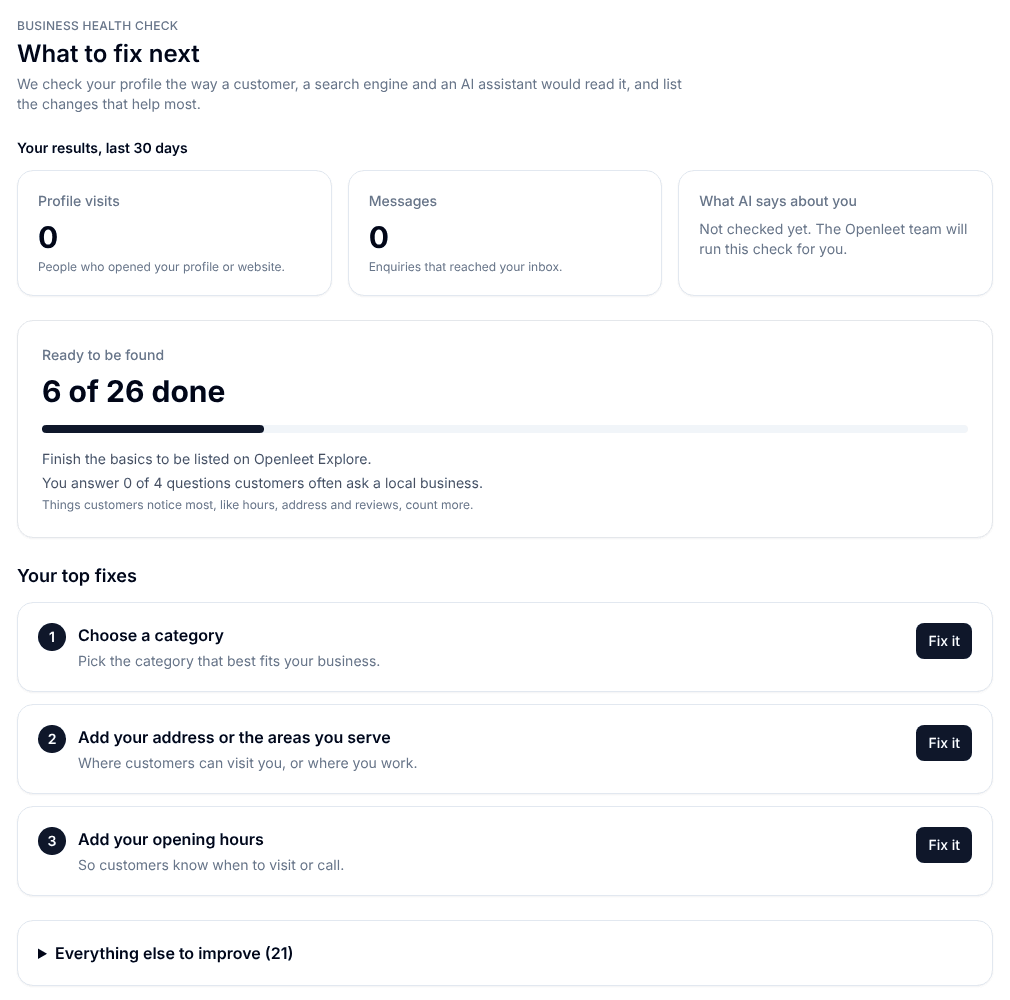
The health check looks for these problems and puts the three that matter most at the top, each with a Fix it button that takes you to the right place.
What you can do
Getting your details right
Name, description, address, service area, hours, phone, email and links, checked for gaps and for details that don't match each other.
Your written content
We compare the phone, email and opening days written in your articles and services with the details you saved.
Your website
We check that the website on your profile loads and that its basic details match.
Your Google listing
We compare your profile with what your public Google listing shows and tell you where they differ. We don't change anything on Google, and we don't store what we read there.
AI assistants
We ask AI assistants about businesses like yours and show which wrong details they repeat, and which page they got them from.
Questions for your kind of business
See how many common questions for your business type you have answered, for example 2 of 7 for an accountant.
Keeping it fresh
Old events, articles that have not been touched in a long time and missing dates are flagged.
How it works
- 1
Open the health check
In your dashboard. The checks of your own profile run every time you open it.
- 2
Fix the top three
Each fix says what is wrong, where we found it and why it matters, with a Fix it button.
- 3
See what you fixed
Finished fixes are listed with the date, so you can see your progress.
- 4
Outside checks
The website, Google listing and AI assistant checks are started by the Openleet team for now. We tell you what changed after each one.
What a fix looks like
Here are fixes like the ones the check found for real businesses during testing, with details changed:
"Check the website address on your profile. The site didn't load when we checked. Customers who click your website link should land on a working page."
"Correct your address where AI assistants read it. A directory page shows an old street address that doesn't match your profile. AI assistants repeat what they find online."
"Use one business name everywhere. Your profile and your second location use different names, so customers and AI assistants can't tell they are the same business."
Good to know
- The health check finds problems. It can't make search engines or AI assistants show your business.
- We can only fix what is on Openleet. For other sites, we tell you what to change and where.
Questions
- Is the health check free?
- Yes, every plan has it. Some fixes need Discovery, for example adding FAQs, a team or credentials.
- Do you change my Google Business Profile?
- No. We only read your public Google listing to compare it with your profile. You make any changes on Google yourself.
- How often are the outside checks run?
- The checks of your own profile run every time you open the page. For now, the Openleet team starts the website, Google and AI assistant checks.
- Will fixing everything make AI assistants recommend me?
- Nobody can promise that. Correct and complete information gives people and AI assistants less reason to get you wrong.
Start with a free profile.
Add the basics for free, then decide later whether a paid plan is worth it for your business. Prices in CAD plus applicable tax, monthly, no contract.